
Independent battery diagnostics

More than
a voltage
reading.

PackGauge reader with the Pack screen visible, showing five cell-bank readings and sample data
PackGauge / standalone readerCurrent prototype · example screen

See cell-group voltages and your battery’s recorded history—without opening the pack or connecting it to a computer.

Working prototypeIn development

Designed for supported 18V lithium-ion tool battery packs.
No purchase option or public release yet.

01 Five cell-bank readings

02 Charge, use & fault history

03 Load & condition charts

On the screen

Your pack.
A closer look.

Explore the same five diagnostic views used on PackGauge. Choose a tab to see the screen and learn what its readings mean.

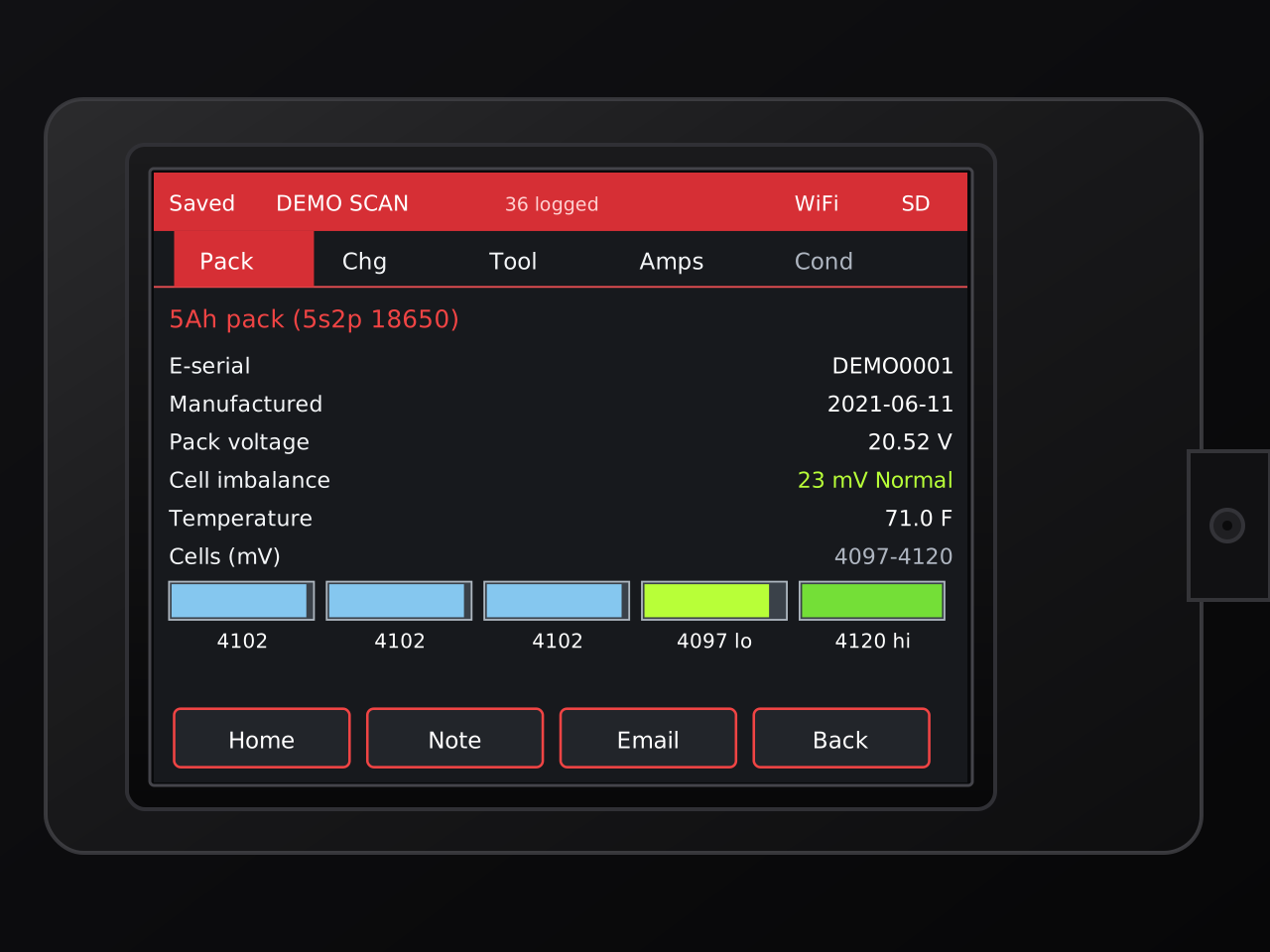
Rendered PackGauge Pack tab showing sanitized pack metadata, pack voltage, cell imbalance, temperature, and five cell-bank readings
Pack tab · current-firmware render

01 / Pack

Five banks.
One quick picture.

The pack view puts the voltage spread in context instead of stopping at total pack voltage.

Pack identity & age
Pack configuration, electronic serial information, and manufacture date when the pack exposes them.
Voltage, temperature & imbalance
See total voltage, pack temperature, calculated cell-bank spread, and a simple on-screen status cue.
Five cell-bank readings
Individual millivolt values with the lowest and highest banks called out directly.

Displayed values are representative sanitized records, not a live measurement or a health/safety certification.

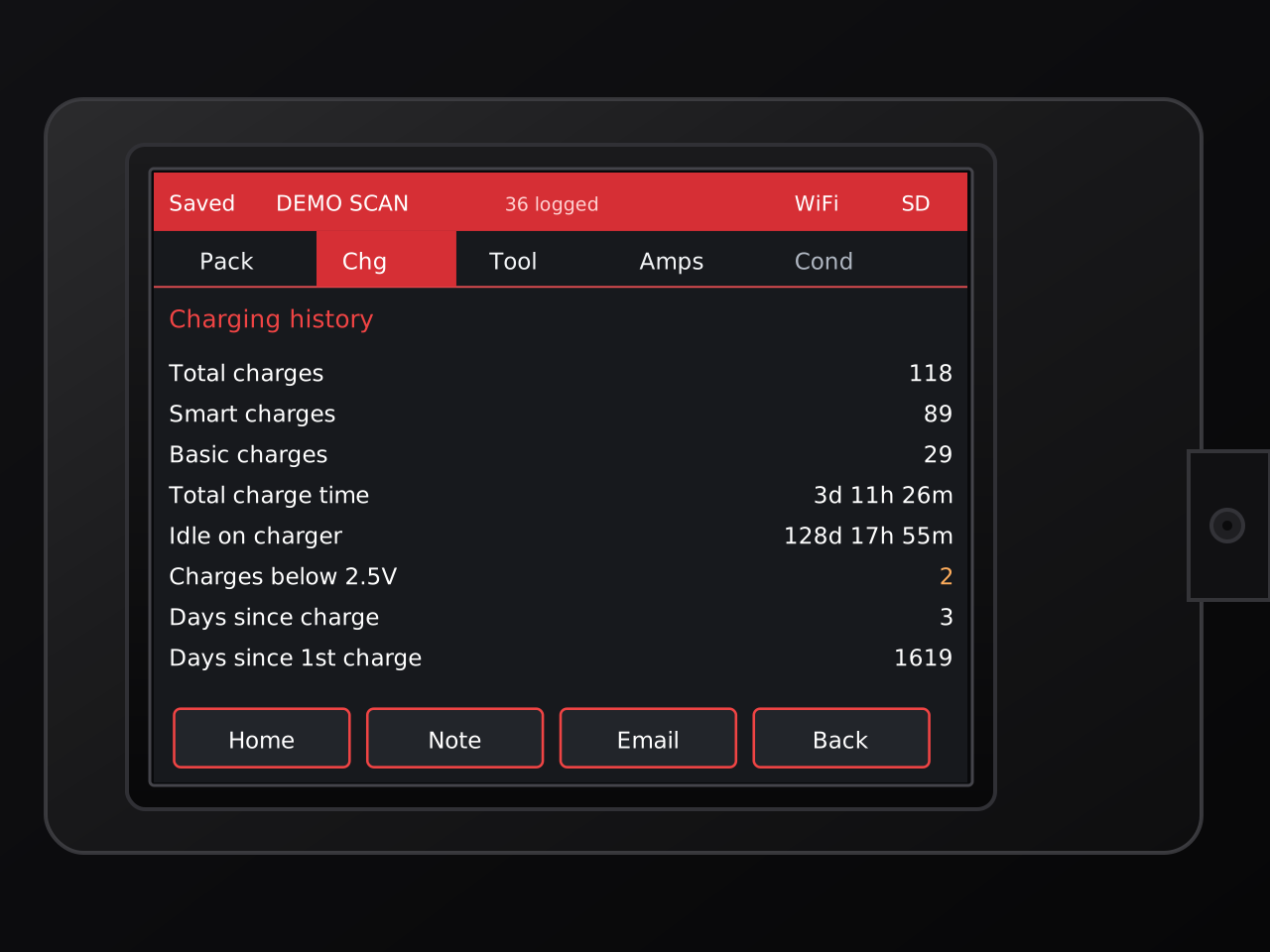
Rendered PackGauge charging-history tab showing charge counts, charge time, charger-idle time, low-voltage charge events, and time since charging
Charge tab · current-firmware render

02 / Charge

See how it
has been charged.

When the pack provides the records, PackGauge can surface more than a simple charge count.

Charge counts
Total charges plus the charging-method counters reported by the pack.
Time on the charger
Accumulated charge time and the separate time the pack has remained idle on a charger.
Low-voltage history
Low-cell-voltage charge events plus days since the latest and first recorded charge.
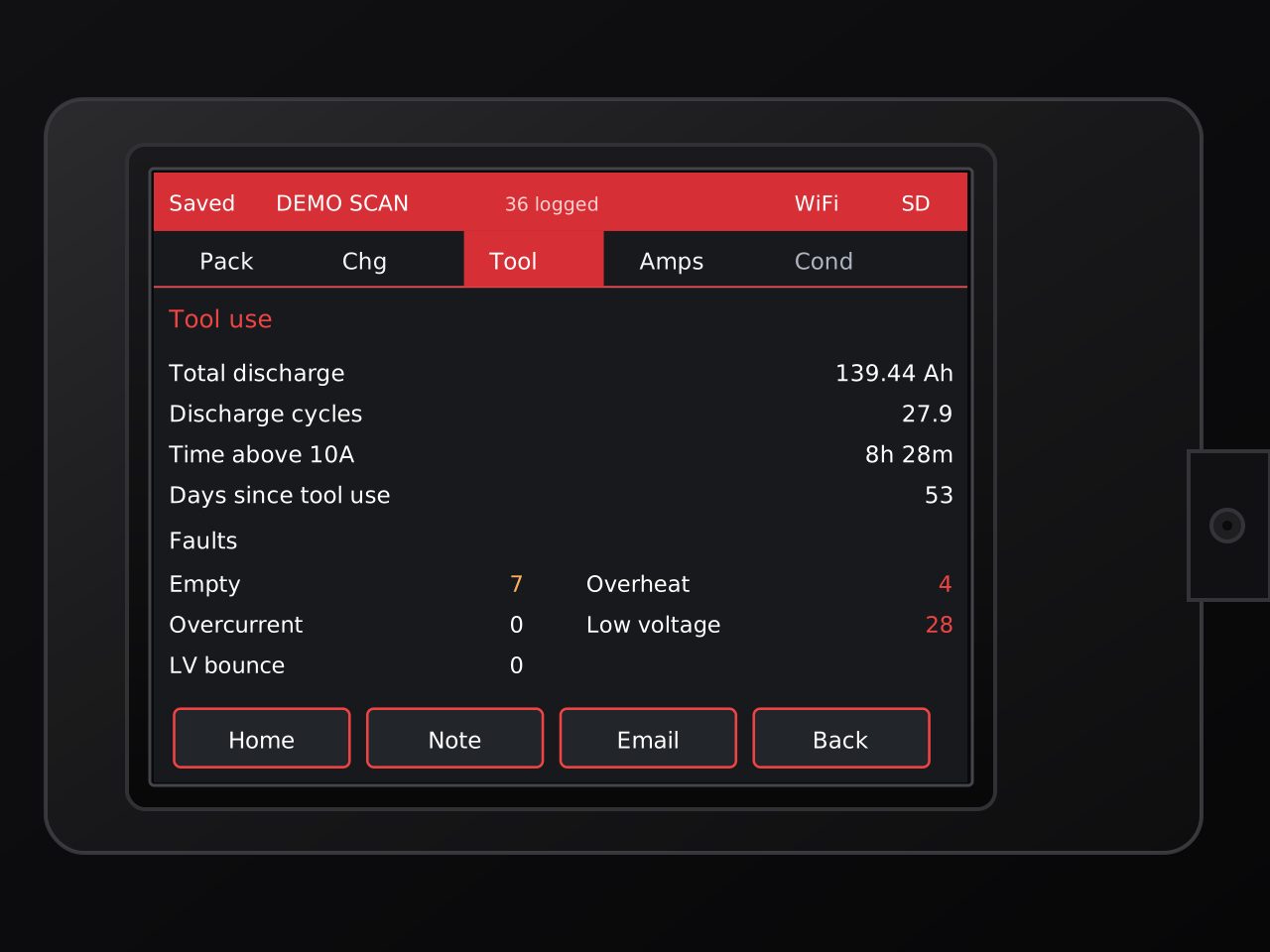
Rendered PackGauge tool-use tab showing total discharge, discharge cycles, high-current time, days since use, and pack fault counters
Tool tab · current-firmware render

03 / Tool

The history
behind the work.

Usage records help show what the pack has experienced between the times you put it on a meter.

Discharge & cycles
Total discharged amp-hours and the pack's reported or derived discharge-cycle value.
Time under load
Accumulated time above 10 amps and days since the most recent recorded tool use.
Fault counters
Empty, overheat, overcurrent, low-voltage, and low-voltage-bounce counters when available.
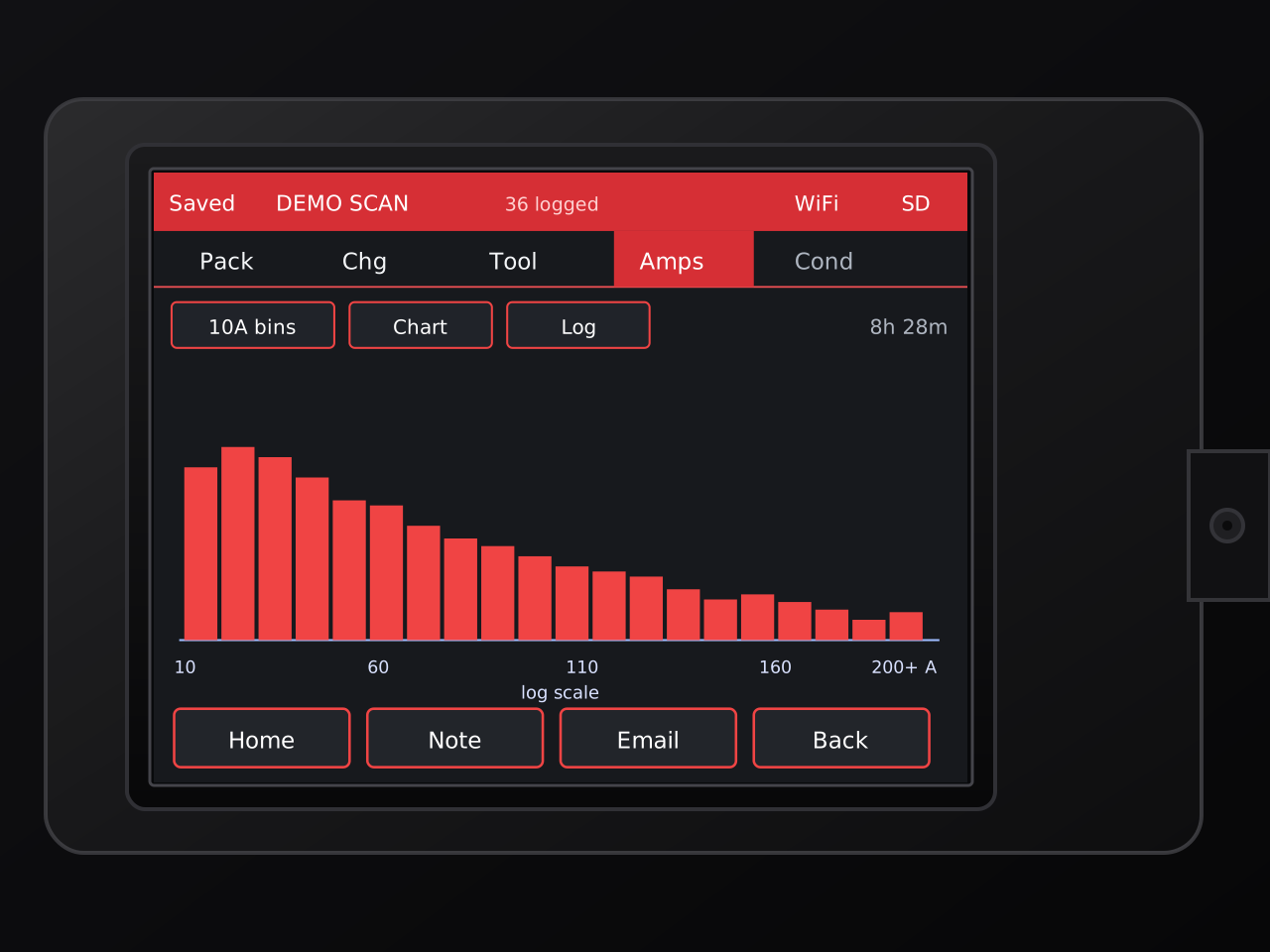
Rendered PackGauge Amps tab showing current-use history in 10-amp bins with histogram and logarithmic-scale controls
Amps tab · current-firmware render

04 / Amps

See where the
current went.

The current-history view can turn a long list of counters into something you can read at a glance.

10-amp load bands
Recorded use grouped into current ranges so time under lighter and heavier loads is easy to compare.
Table or chart
Move between time-and-percentage tables and a histogram view on the touchscreen.
Linear or log scale
Switch scales when the long tail of higher-current use would otherwise be hard to see.
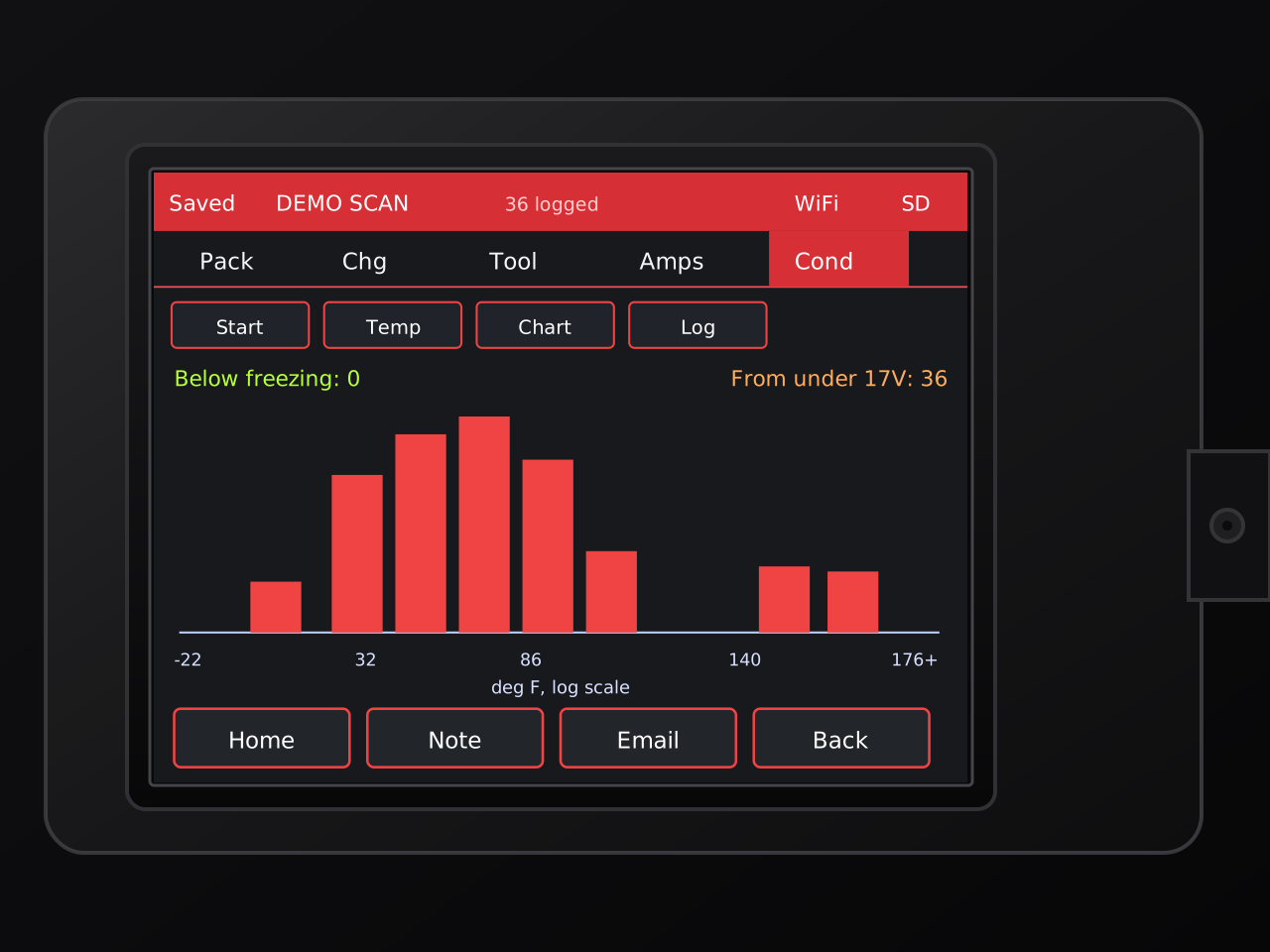
Rendered PackGauge Conditions tab showing temperature-history bins, below-freezing events, under-17-volt events, and chart scale controls
Conditions tab · current-firmware render

05 / Conditions

Heat, cold,
and low voltage.

Condition history adds another layer to the story of how a pack has been stored, charged, and used.

Temperature history
View recorded temperature ranges as a histogram, with temperature and time-oriented modes available.
Cold exposure
A separate count surfaces recorded events below freezing when that history is available.
Low-voltage events
Track records originating below 17 volts, with chart and linear/log display controls.

Built around the workflow

A reader.
Not another app.

PackGauge keeps the scan, history review, notes, saved records, and sharing workflow on the unit. The current prototype also includes on-device setup, touch calibration, Wi-Fi/SD status, and multiple appearance themes.

Pack snapshot
Pack voltage and temperature, five cell-bank readings, imbalance, and pack metadata when available.
History behind the pack
Charging records, discharge/use history, fault counters, current-load bins, and operating-condition history.
Save, annotate & share
Store scans on micro-SD, add notes, revisit records, compare saved scans, and email logs over configured Wi-Fi.
Standalone controls
Touch calibration, setup flow, Wi-Fi and SD status, five appearance themes, and firmware/about information live on the reader.
Front view of the PackGauge reader with its diagnostic screen illuminated
THE READER / STANDALONEReady for a closer look.

A touchscreen, saved records, and a dedicated battery interface in one compact reader.

At the workbench

Connect. Scan.
Take a closer look.

No laptop needed for scanning. A straightforward workflow, from the first connection to the next saved record.

  1. 01 / CONNECT

    Power up.

    Provide USB-C power. Inspect the pack and connect a supported battery using the documented interface.

  2. 02 / SCAN

    Tap Scan Pack.

    Let the reader request the available data, then move through Pack, Charge, Tool, Amps, and Conditions.

  3. 03 / REVIEW

    Keep the details.

    Review the readings, add a note, revisit saved scans, compare records, or send a configured email log.

Do not connect damaged, swollen, wet, unusually hot, or otherwise suspect packs. Read safety & diagnostic limits

How PackGauge started

It started with a simple question
from my dad.

My dad noticed that the battery packs for his cordless mower would indicate a full charge while on the charger, but after removing them and pressing the battery’s fuel-gauge button, they would sometimes show only three bars instead of four. He asked me what might cause that.

Why should I need a laptop every time I want to check a battery?

What started as a simple question about one of my dad’s batteries became PackGauge — a standalone tool built to make battery health easier to see, understand, and share, without opening the pack or connecting it to a computer.

Read the full build story

I started researching how the packs worked and learned more about the individual cell groups inside them and how differences in their voltages can affect the overall health and performance of a battery pack. The problem was that checking those voltages normally meant opening the pack and measuring each group individually — something I wanted to avoid.

While researching, I came across an open-source battery communication project by mnh-jansson and its contributors. I was amazed by how much information they had been able to decode directly from the battery’s communication interface. Suddenly, it looked possible to see the individual cell-group voltages and other useful battery data without opening the pack at all.

I started looking for a small standalone platform and found the inexpensive ESP32-based display commonly known as the Cheap Yellow Display. It already combined a touchscreen, an ESP32 microcontroller, Wi-Fi, and Bluetooth in one compact package. It was more than capable of what I originally had in mind — and opened the door to doing quite a bit more.

The idea grew from simply displaying cell voltages into a handheld battery diagnostic tool that can show cell imbalance, charging and tool-use history, fault counters, current-load and condition charts, save scans, and send results over Wi-Fi.

With the hardware selected and the battery communication work provided by the open-source community as a foundation, I began developing PackGauge with the help of ChatGPT and Claude.

Before you connect

Know what
you're looking at.

Which batteries is it designed for?

18V Red Tool Packs. You know the ones. PackGauge is designed for compatible packs in that ecosystem—not every battery platform. Pack hardware and firmware revisions affect the available data. Read the compatibility details.

Are these the real screens?

Yes—the public artwork is rebuilt from actual current prototype screenshots. The layout, controls, and data categories are real; identifying serial information and third-party-specific labels are sanitized in the website renders.

Does an on-screen status mean a battery is safe?

No. Interface labels and colored readings are diagnostic cues, not an independent health, capacity, authenticity, or safety certification. A small voltage spread or missing fault counter is not a pass result.

Does it repair or reset a battery?

No. The current user workflow reads diagnostic data; it does not offer repair, reset, rebalance, unlock, or reprogram controls. Scanning may cause a pack to refresh its own recorded statistics.

Do I need a computer or Wi-Fi to scan?

The standalone reader is USB-powered and does not need a computer for scanning. Wi-Fi is used for configured network features such as sending email. Saved scan records use micro-SD.

Project status / In development

Have a question?
Get in touch.

The hardware and interface are still being refined. There is no public downloadable release or purchase option on this site yet.

PackGauge interface render

1 of 5

Vector reconstruction of a current firmware screen. Not a live connection or an independently verified battery assessment.